
Direct answer: Use database search for common foods, manual entry when you have exact label or recipe data, a barcode to locate a packaged product, and a photo to draft a mixed-meal estimate. Always verify the product and portion. Voice can capture a description quickly, but still needs interpretation and is not a confirmed IGN8 launch feature.
What makes a food log useful?
A useful record is complete enough to answer your question and simple enough to repeat. Logging “chicken salad” in seconds is not helpful if your entry represents a different recipe and portion. Spending ten minutes calculating every leaf is not helpful if the effort makes you abandon the diary after two days.
Digital self-monitoring can support behavior change, but the evidence does not say every person needs maximal detail. A systematic review of 59 dietary self-monitoring interventions found that both lower- and higher-intensity approaches may support weight-loss interventions, while differences in adherence and methods make direct comparisons difficult. The practical lesson is to choose a level of detail you can use consistently.
Five ways food tracker apps capture a meal
1. Database search
Search is a strong default for common foods and ingredients. It gives you control over the exact match and serving, but similar names can hide different preparations. Check whether the result is raw or cooked, sweetened or unsweetened, and generic or branded. For a reference point, USDA FoodData Central publishes multiple types of food-composition data.
2. Manual entry
Manual food logging is useful when you have a label, a known recipe or nutrition information that is missing from search. Enter calories, protein, carbohydrates and fat for a clearly defined serving, then record the quantity you consumed. Manual control also makes errors possible, so check units and decimal places.
3. Barcode lookup
A barcode can retrieve a packaged product quickly. It does not measure the contents or how much you ate; it identifies a record supplied by a database. Compare the product name and Nutrition Facts with the package in your hand. The FDA serving-size guidance explains why one package can contain more than one serving.
4. Photo estimate
A photo can create a starting record for a mixed meal without naming every visible item first. The tradeoff is inference: the system must identify foods and estimate portions while oils, fillings and preparation may be hidden. Image-based dietary research reports meaningful measurement error, so edit the result rather than treating it as exact.
5. Voice description
In products that support it, voice can turn a spoken description such as “oats with milk and berries” into a draft. It still needs a food match, quantity and review; natural language does not reveal an exact recipe. IGN8 does not currently make a public claim for live voice food logging, because that service is not verified for launch.
Pick the method by meal, not by hype
| Method | Best starting use | Main check | Current IGN8 status |
|---|---|---|---|
| Search | Common foods and ingredients | Correct preparation and portion | Confirmed flow |
| Manual | Known label or recipe values | Units, serving and entered macros | Confirmed flow |
| Barcode | Packaged branded food | Record matches the current label | Under launch verification |
| Photo | Quick mixed-meal draft | Foods, portions and hidden ingredients | Under launch verification |
| Voice | Hands-free draft where supported | Every parsed item and amount | Not a confirmed launch feature |
A low-friction logging workflow
-
Start with the most specific source
Use the product’s label for packaged food, a recipe for a home-cooked batch, and a reputable database for a basic ingredient. A convenient match is only useful when it represents the food.
-
Set the consumed quantity
Check grams, ounces, cups, pieces or package fractions. The portion you ate may differ from the database default. If you prepare a batch, divide the total recipe into the number or weight of portions actually served.
-
Capture easy-to-forget extras
Include cooking fats, dressings, drinks, toppings and tastes while preparing food when they matter to the question you are tracking. These are often invisible to a meal photo and absent from a generic restaurant match.
-
Review the day, not just the entry
Look for missing meals and obvious outliers. Calories and macros should reflect the foods recorded. Correct clear mistakes; do not keep editing simply to force the day to match a target.
-
Create a repeatable default
If breakfast rarely changes, use the same verified entries and update only the portion or changed ingredient. Reserve more detailed work for new recipes and unfamiliar meals.
How food logging works in IGN8 today
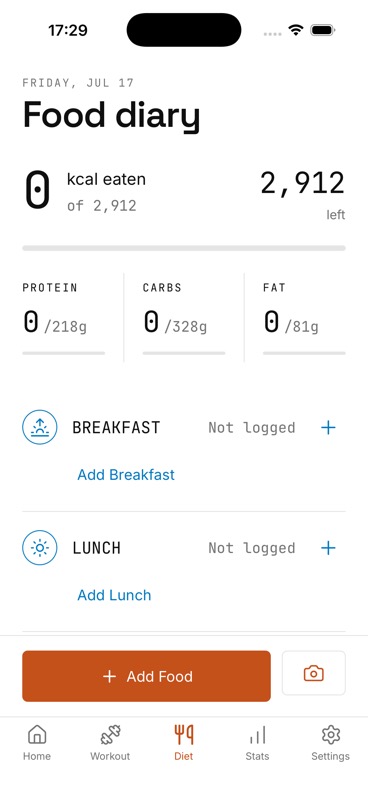
IGN8’s confirmed public-safe flows are food search and manual entry. Add an item to breakfast, lunch, dinner or snacks, set its quantity, and review calories, protein, carbohydrates and fat in the diary. Entries can be edited or deleted, and the daily totals appear alongside your nutrition targets.
The app interface also contains camera and barcode paths, but the production services behind photo analysis and barcode resolution remain under launch verification. No scan-accuracy or coverage claim is being made. Voice logging is not a confirmed current feature.
The combined advantage
A food diary that is not isolated from training
IGN8 connects the confirmed meal log with today’s workout, a weekly gym plan and progress trends. That gives you one routine to maintain instead of a calorie tracker, a separate workout logger and disconnected notes.
Sources and further reading
- Public Health Nutrition: Review of dietary self-monitoring methods
- Clinical Nutrition: Meta-analysis of image-based dietary assessment validity
- USDA FoodData Central: Food-composition data
One daily record
Log meals beside the workout they support
Join the IGN8 early-access waitlist for launch news and be first to bring workout planning and food tracking together.