
Direct answer: A photo calorie tracker analyzes a meal image, proposes food matches and portion sizes, then maps those foods to nutrition data to estimate calories and macros. It can make capture faster, but it cannot see hidden oils, fillings or exact weight. Review every item, correct the portion and add missing ingredients before saving.
How a food photo becomes a calorie estimate
Most image-based systems perform several separate tasks: find the food regions in the image, classify the likely foods, estimate volume or portion, and connect those results to a nutrient database. A systematic review of image-based food-recognition systems describes this same sequence. Each step introduces uncertainty.
A plain apple on an uncluttered surface is a different problem from a curry containing oil, coconut milk, vegetables and meat. The photograph may suggest “curry,” but not its full recipe or how much of each ingredient is present. Even a correct food identification can produce a poor calorie estimate when the portion is wrong.
Use a photo tracker as a draft, step by step
-
Capture the whole meal before eating
Keep every item visible, including drinks, sides and condiments. Use good light and avoid overlapping foods when practical. An image-assisted dietary assessment review found that incomplete or low-quality captures can contribute to underestimation.
-
Check the food identity
Confirm that grilled chicken was not read as breaded chicken and that yogurt was not matched to a sweetened product. For mixed dishes, decide whether a complete recipe match or separate ingredients better represents what you ate.
-
Correct the portion
Use a known package weight, kitchen scale, measuring utensil or sensible household measure when available. The NIDDK guide to food portions distinguishes your actual portion from the serving shown on a label—two numbers that often differ.
-
Add what the camera cannot see
Cooking oil, butter, dressings, sauces, toppings and fillings can materially change an entry. Add them separately when the proposed result does not account for them. A clear image still cannot reconstruct a recipe with certainty.
-
Save only after the calories and macros look plausible
Compare packaged food with its label and familiar meals with previous entries. “Plausible” is not “exact”; it is a final reasonableness check that catches obvious mismatches before they become part of your daily totals.
Photo, barcode or manual entry?
| Situation | Useful starting method | What to verify |
|---|---|---|
| Home-cooked mixed meal | Photo draft or manual recipe | Ingredients, cooking fats and your portion |
| Packaged food with a label | Barcode match or search | Product, serving size and amount eaten |
| Simple whole food | Search or photo draft | Weight, size and preparation |
| Repeat meal | Previous manual/search entry | Whether the recipe or portion changed |
| Restaurant meal | Published restaurant data if available | Exact menu item, modifications and portion eaten |
A barcode is an identifier, not a nutrient sensor. It can retrieve a product record, but you still need the correct product and serving quantity. A photo is broader but must infer what is visible. Search and manual entry take more input, yet they give you direct control over the match and amount.
Is photo calorie tracking accurate?
No photo calorie tracker should be treated as exact. In a systematic review and meta-analysis of image-based dietary assessment, the methods showed meaningful measurement error and, overall, under-reported energy compared with reference methods. Performance varies with the foods, image quality, portion method and comparison standard.
That does not make a photo useless. Its value can be reducing recall and creating a fast record that you actively verify. The right question is not “Did the camera know the exact calories?” but “Did this draft help me create a more complete, consistent entry?”
How meal capture fits into IGN8
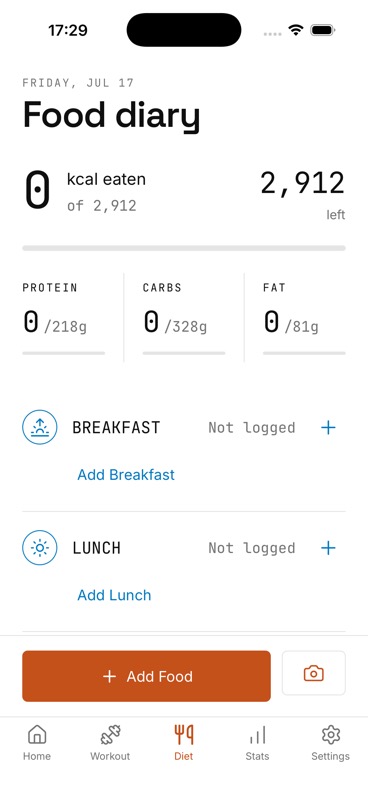
IGN8’s current app interface includes paths for camera capture and barcode detection, alongside food search. However, the production photo-analysis and barcode-lookup services are still under launch verification. They are not being presented as available or accuracy-validated launch features yet. Database search and manual entry are the confirmed public-safe ways to add calories, protein, carbohydrates and fat to the meal diary.
The IGN8 principle
Review first, then connect the entry to your day
When production photo and barcode services pass end-to-end testing, the intended flow is to capture, review, edit and save—never to treat an estimate as unquestionable. Saved nutrition then sits beside your workout plan and progress trends in the same app.
Sources and further reading
- Advances in Nutrition: Systematic review of image-based food-recognition systems
- Clinical Nutrition: Validity of image-based dietary assessment methods
- U.S. Food and Drug Administration: Serving Size on the Nutrition Facts Label
One app, full context
Be first to connect meal and workout tracking
Join the IGN8 waitlist for launch news and early-access updates as production features complete verification.