Direct answer: Track each workout by recording the exercise variation, working sets, reps or duration, weight used, and whether each set was completed. Add rest time or a short note only when it helps explain performance. Log during the session, then review repeated exercises across several workouts rather than judging one day.
A useful gym log is a record, not a diary
The purpose of a workout tracker is to answer a practical question: what should I attempt when this exercise appears again? “Bench press—good” cannot answer it. “Barbell bench press—3 sets of 8 at 60 kg, final set challenging” can. The record does not need to be long; it needs consistent fields and an honest account of what happened.
Tracking is also a way to see whether your plan is being performed. The U.S. Department of Health and Human Services describes frequency, intensity, sets and repetitions as components of muscle-strengthening activity in its Physical Activity Guidelines presentation. Those same fields form a clean gym log. The federal guidance recommends adults include muscle-strengthening activity involving all major muscle groups on at least two days each week, although individual circumstances differ.
How to log a workout step by step
-
Start from a planned workout
Open a reusable session with the exercise order and target sets already in place. Planning first saves time between exercises and gives you a clear comparison between intended and completed work. If you train flexibly, choose the session before the first working set.
-
Name the exact exercise variation
“Row” is ambiguous. “Chest-supported dumbbell row” is comparable next time. Machine model, grip, stance or range of motion can change the exercise enough to affect the number. You do not need every detail—only details that make two entries meaningfully alike.
-
Separate warm-ups from working sets
Log the sets you want to compare consistently. Warm-up sets can be useful, especially for heavy work, but do not mix them into working-set totals without a clear label. That avoids making one workout look larger simply because it included more preparation.
-
Enter reps and weight immediately
Record a set when it finishes, while the load and rep count are certain. For timed movements, use duration instead of inventing reps. If a set stopped early, log what happened rather than the target. Your future plan needs the completed number.
-
Use notes sparingly
Add context when it changes interpretation: a substitute exercise, altered equipment, pain-free reduced range, an interrupted session or a deliberate technique change. Avoid turning every set into a journal entry. A short, specific note is easier to scan later.
-
Finish and review the session
Mark completed sets, finish the workout record and check for missing entries before leaving. Later, compare the same exercise across several exposures. Look for a pattern in reps, load, completed work and context—not a single personal-best number.
The minimum viable workout log
| Field | Example | Why it matters |
|---|---|---|
| Exercise variation | Incline dumbbell press | Keeps comparisons like for like |
| Working sets | 3 completed | Shows total planned work performed |
| Reps or duration | 10, 9, 8 reps | Shows output within each set |
| Load | 22.5 kg per dumbbell | Makes the next attempt concrete |
| Context, when needed | Different bench angle | Explains a comparison that is not equivalent |
How to read your workout history
Open one repeatable exercise and look across at least a few sessions. Did you complete more reps at the same load? Use more load for the same reps? Complete the planned sets more consistently? Was the movement variation the same? These are clearer questions than “Was today good?” They also support gradual progression without forcing an increase every session.
Review adherence at the workout level too. A gym log app should show which sessions you finished, not only isolated exercise records. If a workout is repeatedly skipped or cut short, consider whether the schedule or session length needs to change before blaming motivation.
How workout tracking works in IGN8
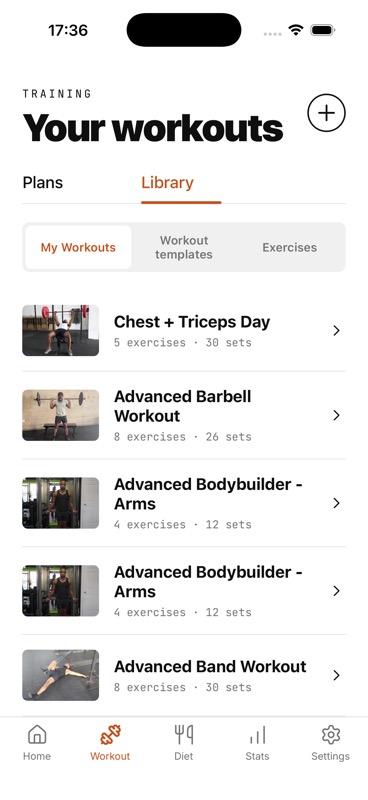
Create or choose a plan, save reusable workouts and schedule them to selected days. The Workout Library keeps each saved workout’s exercise and set counts visible. When you start training, the active workout shows exercise progress and elapsed time; you can enter weight and reps or duration, complete sets, add or delete sets, and use the rest timer.
IGN8 also shows key-lift trends and planned-versus-completed workout information in Stats. That keeps the session log connected to the weekly plan. It does not score your technique or automatically prescribe the next load—you make the progression decision from your record and judgment.
Sources and further reading
Every set has context
Make the next workout easier to plan
IGN8 is pre-launch. Join the waitlist for launch news and early-access updates.