Direct answer: Track progressive overload by comparing the same exercise under similar conditions and increasing one training variable gradually—usually repetitions within a target range, load, or planned sets. Record every working set, not only the best one. Progress when the completed log and repeatable technique support it; hold or reduce the target when they do not.
What progressive overload means
Progressive overload is the planned increase of training demand over time. In a gym log, the clearest forms are more repetitions with the same load, more load for comparable repetitions, or—when the program calls for it—additional working sets. The increase should be gradual enough that the movement remains appropriate and the record remains comparable.
Progress is not limited to adding weight every workout, and a heavier number is not automatically better if the range of motion, equipment or exercise variation changed. The Physical Activity Guidelines for Americans describes progressive muscle-strengthening work and notes that greater frequency, weight or resistance can produce greater improvements in muscle function. ACSM’s 2026 position-stand summary likewise emphasizes consistent resistance training and tailoring load and volume to the individual goal rather than defaulting to unnecessary complexity. Read the official ACSM update.
A simple progressive-overload tracking method
-
Keep the exercise definition stable
Use the same exercise variation, equipment setup and meaningful range of motion when you compare sessions. If the variation changes, label it as a new record. A machine press and a barbell press may train similar areas, but their loads are not interchangeable.
-
Choose a target set and rep range
For example, your plan might call for three working sets of 8–10 repetitions. The range gives you a progression path without requiring a load increase every time. It is an example, not a universal prescription; appropriate programming depends on your goal and circumstances.
-
Record every working set
Enter the load and actual reps immediately after each set. “3 × 10” hides whether the result was 10, 10 and 6. Set-level data shows whether performance was maintained across the planned work.
-
Progress one variable at a time
First add reps within the range while keeping the load stable. When the chosen progression rule is met, make a small load increase and return toward the lower end of the range. Avoid simultaneously adding load, sets and frequency; it makes the change harder to interpret and may be too large.
-
Keep useful context
Note a changed bench angle, different machine, shortened rest or technique modification. You do not need to score every feeling. Record context only when it explains why two sessions are not a clean comparison.
-
Review the trend, then decide
Compare several exposures. If reps or load rise while the exercise remains comparable, the log shows increased work. If performance stalls, first check consistency, sleep, schedule, exercise fit and whether the planned progression is realistic. A plateau is a prompt to review, not proof that you need more volume.
Progressive overload example
This illustrative “double progression” uses three sets with an 8–10 rep target. It is a logging example, not a prescribed load or pace.
| Session | Load | Completed reps | Next decision |
|---|---|---|---|
| 1 | 60 kg | 8 / 8 / 8 | Keep load; aim within range |
| 2 | 60 kg | 9 / 9 / 8 | Keep load |
| 3 | 60 kg | 10 / 10 / 10 | Progression rule met |
| 4 | 62.5 kg | 8 / 8 / 8 | Build reps again |
Real progress is rarely this tidy. Some sessions repeat or move backward. The value of the method is that it tells you what happened and prevents one unusually good set from replacing the full record.
How to track progressive overload in IGN8
Build or choose a reusable workout so the same exercise returns with planned sets and rep ranges. In an active workout, log weight and repetitions for each set, mark completed sets and use the rest timer to keep session context more consistent. Exercise instructions and media can help you confirm which variation the workout intends.
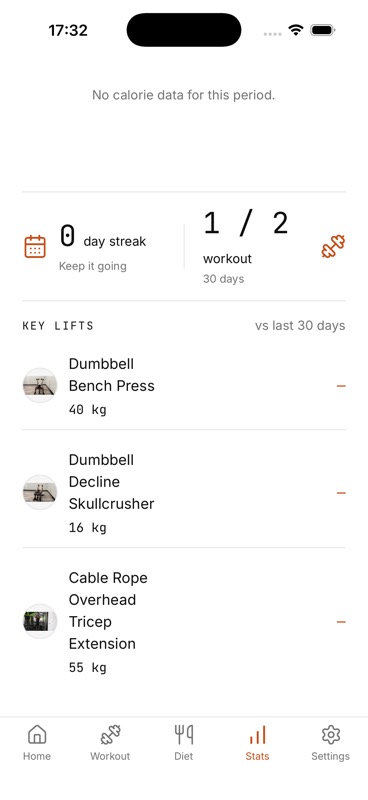
Afterward, use the key-lift section in Stats to follow tracked weights over time and the workout-frequency view to keep progression connected to attendance. IGN8 does not automatically choose the next load, assess technique or guarantee progression. The log gives you evidence for your own next decision.
When not to increase the target
Hold the load when you did not complete the current rep range, when the movement changed enough to break the comparison, or when adding weight would compromise safe execution. Reducing a target can also be a rational training decision after time away, illness or a planned easier period. A tracker should preserve that context rather than label every decrease as failure.
Sources and further reading
The next set starts with the last one
Keep your plan and progress in one record
IGN8 is pre-launch. Join the waitlist for launch news and early-access updates.