
Direct answer: To track calories and macros, begin with a reasonable estimated daily target, log everything you eat using the portion you actually consumed, and monitor calories plus protein, carbohydrates and fat. Use package labels or a reputable food database, correct mismatched servings, and review patterns across several days instead of judging one meal in isolation.
What calories and macros tell you
Calories describe the energy supplied by food and drink. “Macros” are the three energy-providing macronutrients most food trackers show: protein, carbohydrate and fat. The four numbers answer different questions. Calories help you compare intake with an estimated energy target; the macro split shows where that energy came from.
They are measurements, not a complete rating of food quality. Fiber, vitamins, minerals and the overall variety of your diet still matter. The USDA MyPlate framework is a useful reminder to include a variety of food groups, while the FDA Nutrition Facts guide explains how serving information and nutrients are presented on packaged foods.
A five-step calorie and macro tracking routine
-
Choose a starting estimate
Use your age, body data, activity and goal to establish a starting point. Treat the number as an estimate, not a prescription. Energy needs vary, and a target becomes useful only when compared with your own consistent records and longer-term trend.
-
Log the food you actually ate
Select the closest food match and enter the consumed quantity—not automatically the package’s default serving. The FDA notes that a label serving reflects an amount commonly consumed, not a recommendation. If you eat two listed servings, the calories and nutrients are doubled.
-
Make portions comparable
Weights in grams are often easiest to repeat at home. Cups, tablespoons, pieces and package fractions can also work when they match the label. For unlabelled foods, use a consistent database entry. USDA FoodData Central is the federal government’s comprehensive source of food-composition data.
-
Check totals during the day
Reviewing after breakfast or lunch gives you information while there is still time to plan—not a reason to “make up” for food. Look at calories and each macro together. If protein is repeatedly lower than your chosen target, for example, you can plan a familiar protein-containing food at a meal rather than relying on a late guess.
-
Review trends, then make one change
Day-to-day intake naturally varies. Compare several normal days, training consistency and body-weight trends before changing your target. A single restaurant meal, missed log or scale reading is weak evidence. If a target needs adjustment, change one input and give the new routine time to produce a clearer pattern.
A simple worked logging example
This table demonstrates the mechanics only; it is not a meal plan or a recommended target.
| What happened | Weak entry | Better entry |
|---|---|---|
| You ate the whole two-serving pack | Leave quantity at one serving | Change quantity to two servings |
| You cooked with oil | Log only the main ingredients | Include the amount of oil used in your portion |
| A restaurant meal has no label | Choose the first generic result | Pick the closest preparation and use an honest portion estimate |
| Your lunch recipe makes four portions | Log the full recipe every day | Log the ingredients, then record one-quarter per portion |
How to track calories and macros in IGN8
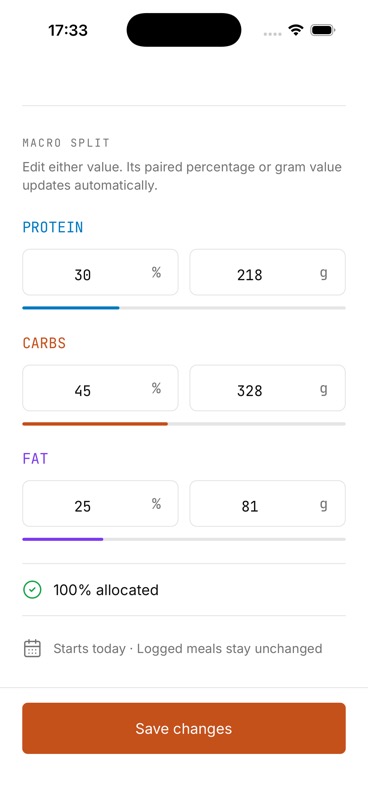
During setup, IGN8 uses your body data, activity level and goal to calculate a starting calorie and macro estimate. You can then add food to breakfast, lunch, dinner or snacks with confirmed database search or manual entry. The Nutrition view totals calories, protein, carbohydrates and fat against the day’s targets, while the Home dashboard keeps that progress beside your next or active gym workout.
One daily system
Connect the meal log to the workout log
IGN8 does not automatically alter your diet because of a workout or deduct exercise calories from your food target. It gives you one place to record both sides of the routine, inspect calorie, consistency, workout, key-lift and weight trends, and decide what to adjust.
Sources and further reading
- U.S. Food and Drug Administration: Serving Size on the Nutrition Facts Label
- USDA FoodData Central: About the food-composition database
- National Institute of Diabetes and Digestive and Kidney Diseases: Food portions
Train. Eat. Progress.
Track the whole routine in one place
Join the IGN8 early-access waitlist and be first to know when the workout planner and calorie tracker launches.